

Welcome here, today i would be introducing to you how to schedule and post to your twitter account anytime you want automatically with your Android smartphones.
I have just detected the TWEETCASTER application for Android, i-phone, and i-pod Touch devices. I have been using it and found it very useful.

Now i would be explaning to you how to auto-schedule and post to twitter anytime with your Smartphones:
Download and Install Tweetcaster from playstore
Or
Download and Install Tweetcaster from apple store
Launch the application and Click on add (+ sign as shown in the image below) to login your twitter account.
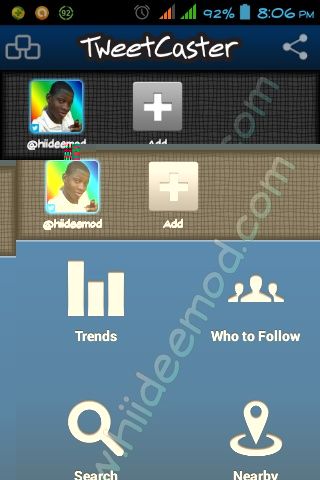
Enter your details and authorize the tweetcaster application.
Your next page should be like the image below.
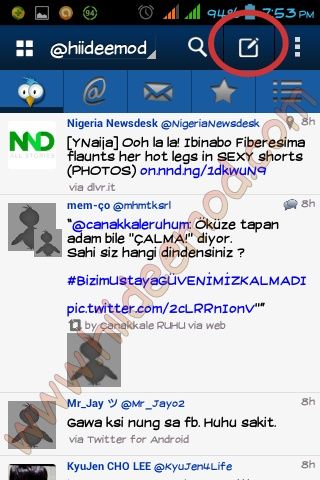
Now Click on the “compose icon” and compose your tweet.

Now Press your menu button and select post later from the pop up page.
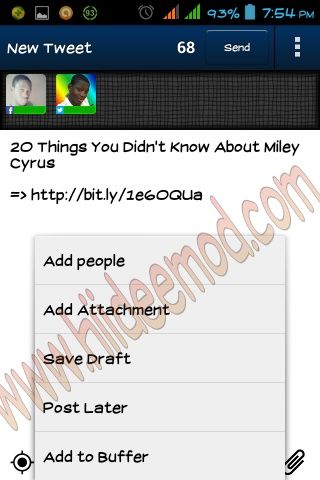
Now select date and actual time you want your tweet to be submitted to twitter. Click on “ok” when you are done.
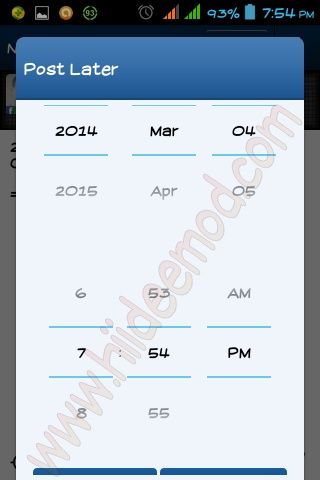
You are now done. Share your view on the application by using the comment box below and hit the Share buttons.