


WhatsApp continues to evolve with features that make sharing and communication more flexible. One of its latest additions is the WhatsApp Status Reshare Button and Status likes. Status editor is expected to be released later. WhatsApp Status Reshare feature is a simple but powerful tool that lets users decide whether others can share their WhatsApp status updates. The feature gives you more control over how your content spreads and is especially useful for people who post business updates, announcements, or creative content they want others to easily reshare. If you don't have a WhatsApp account, you can sign up for one with your phone number.
If you haven’t seen it yet, the WhatsApp Status Reshare Button appears when you view or post a WhatsApp status. When turned on, anyone who can see your status will also see a small “Reshare” icon that lets them share it directly with their own contacts. If you prefer to keep your updates private, you can easily turn this option off. The best part is that WhatsApp makes it very easy to enable or disable this feature whenever you want.
There are two main ways to activate the Reshare Button: either by using your Status Privacy settings or while you’re about to post a new status. Both methods work on Android and iOS, and you can choose whichever feels more convenient.

🔹 Method 1: Activate Through Status Privacy Settings
This method lets you enable or disable the Reshare Button for all your future statuses.


1. Open WhatsApp on your Android or iPhone.
2. Tap the Status tab / Status creation Menu at the top or bottom of the screen.
3. Tap the three dots or Settings icon (depending on your version).
4. Select Status Privacy.
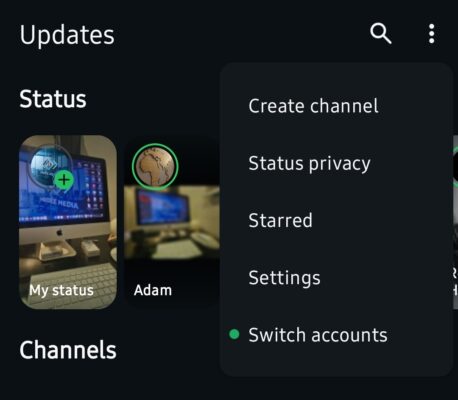
5. Look for the option “Allow Sharing” or “Turn On Reshare Button”. This will activate the status resharing feature.
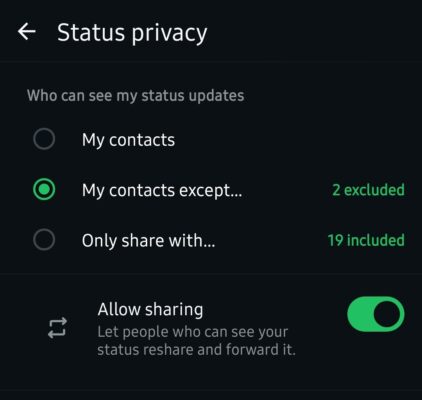
6. Toggle it ON to allow others to reshare status updates. You can also choose who can reshare — Everyone, My Contacts, or My Contacts Except…
Once enabled, anyone who can view your status will have the option to reshare it directly, without needing to take a screenshot or forward it manually.
🔹 Method 2: Activate While Posting a New Status
If you prefer to manage sharing on a post-by-post basis, WhatsApp also lets you enable the Reshare Button while creating a new status update.
1. Open WhatsApp and go to the Status tab.
2. Tap the Camera or Text icon to create a new status and choose HD Media option.

3. Before posting, look for the Status settings or Status details. Tap the icon at the bottom left of your screen. Now activate the “Reshare” or “Allow Sharing” toggle.
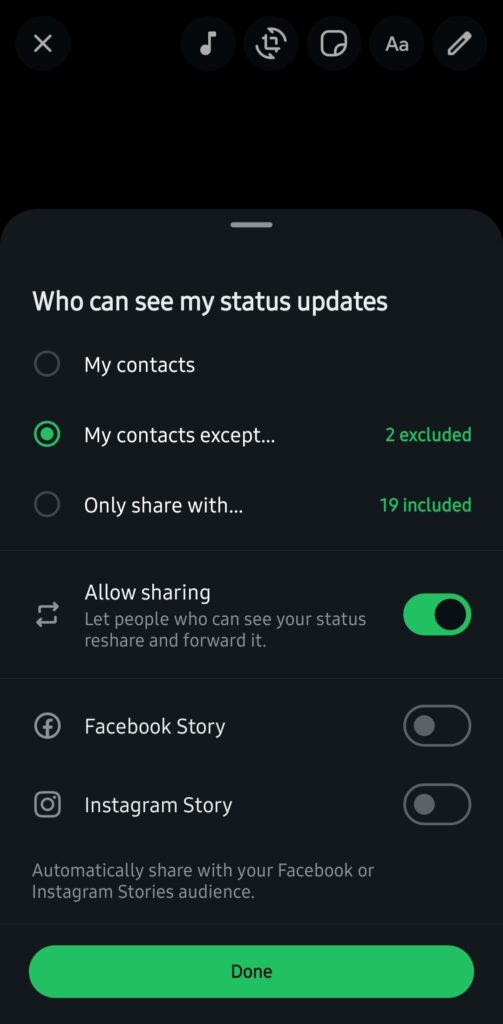
4. Turn it ON to make that specific status shareable.
5. Tap Done/Post to upload your status.
That’s it! Your friends and contacts will now see a Reshare option on your status update, allowing them to share it with their own contacts directly.
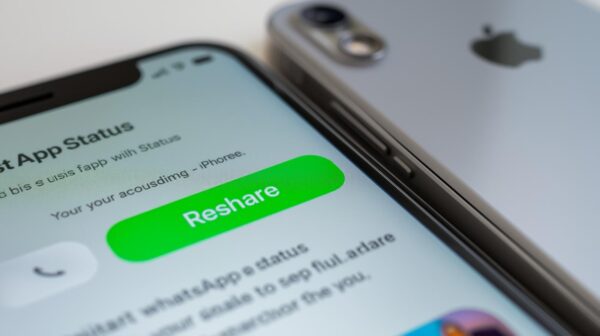
Why Use the Reshare Button?
The WhatsApp Status Reshare Button offers both convenience and control, making it one of the most practical features for everyday users and businesses alike. For brands, creators, and entrepreneurs, it provides an easy way to increase organic reach. Followers can quickly share promotional or informational statuses with their own contacts, helping your message spread faster without any extra effort.
For regular users, the feature is equally valuable. It helps maintain privacy and control by allowing you to decide exactly who can share your content. Whether you want only close friends or everyone in your contact list to have access, you can customize your settings accordingly. It’s a perfect balance between wider visibility and personal privacy. You decide what’s shareable and what stays private.
Another major advantage of the Reshare Button is how seamless and efficient it makes sharing. Instead of taking screenshots or manually forwarding a post, users can reshare a status with just one tap. This saves time, maintains image quality, and eliminates unnecessary steps.
⚠️ Important Notes
- The Reshare Button feature is still rolling out gradually, so you might not see it immediately.
- Ensure your WhatsApp app is updated to the latest version on the Google Play Store or the Apple App Store.
- You can turn off the Reshare option at any time using the same steps above.
Conclusion
The new WhatsApp Reshare Button brings flexibility and better privacy control to your Status updates. Whether you want your content to reach more people or stay within close friends, you now have the power to decide. Take a moment to explore this feature and tailor your sharing preferences to suit your needs.